 MacHgMacHg is a free open source OSX GUI for the distributed revision control system Mercurial. This allows you in a nice graphical way to manage a collection of files, to add things to the collection, to save a snapshot of the collection, to restore the collection to an earlier state and in general to work with the files. In my humble opinion it's the best Mercurial client for OSX. For OS X 10.7+ (Lion, Mountain Lion, Mavericks, Yosemite) (An older version exists for 10.6+) |
    |
MacHg Features
- Designed and updated for the latest OSX's ( 10.10+ Yosemite)
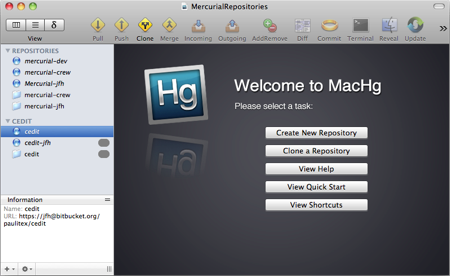
- Document based structure with multiple repositories per document
- View incoming and outgoing at a glance between compatible repositories
- Auto refreshes the status of tracked files and / or repository changes as they occur
- Incremental loading of history (for efficiency)
- Works with large repositories (ie for example can easily load and work with the Mozilla repository which is 3.35Gb)
- Fully compatible with command line Mercurial (You can make changes on the command line and they are reflected in MacHg.)
- Includes a built in copy of Mercurial so there is no possibility of incompatibility
- Fully multi-threaded using Grand Central Dispatch and threading goodness
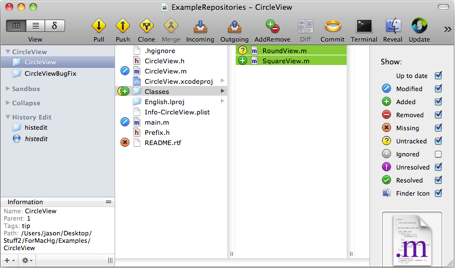
- File browser view to work with files
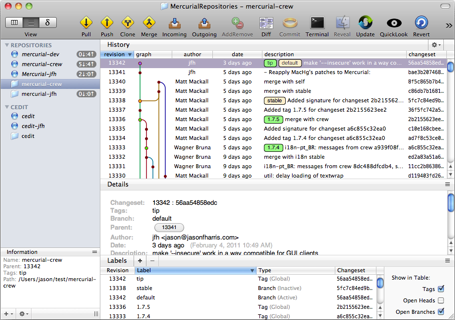
- History view to explore the changeset history
- Stable history graph layout algorithm
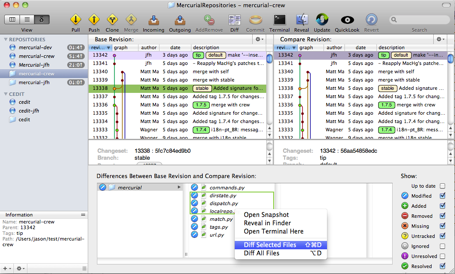
- Differences view to explore the historical changes between different revisions
- Interacting with other repositories: pull, push, incoming, outgoing, clone, etc
- Contextual menus, shortcuts, drag and drop in many places
- Fully integrated support for diffing and merging including zero configuration for: FileMerge, AraxisMerge, P4Merge, DiffMerge, KDiff3, DeltaWalker, Kaleidoscope, Changes, DiffFork, BBEdit, and TextWrangler
- QuickLook is supported in all main views
- Renaming, merging, updating, reverting, adding files, removing files, etc
- Add and remove local tags, global tags, bookmarks, and branches
- Interface to history editing: collapse, histedit, rebase, strip, amend
- Importing and exporting of patches
- Uses the Sparkle framework for "in application" updates

Revision control: Mercurial is a distributed version control system. Distributed Revision Control Systems (DVCS's) are a relatively new development in the overall class of revision control systems, and Mercurial is one of the leading systems in this new class of revision control systems. For more on Mercurial see: Definitive Guide : revision control primer. Other modern distributed revision control systems are git and bazaar. For a good general guide to DVCS's see Version Control by Example. There are various organizations which do commercial support of Mercurial.


Auto refreshes: When working with a repository any changes to the files in the repository or to the repository itself are automatically detected using apples FSFileEvents. This means the status of the repository and its tracked files when they change on your computer are automatically reflected inside MacHg.

Incremental loading of history: MacHg will incrementally load the changeset history in chunks. Thus updates are super speedy since they don't need to pull in the entire changeset history in a single hit. (It's of course more complicated internally to manage this incremental loading, which is why some lesser clients are brought to their knees when they load the entire history at once. Not so with MacHg.)

Industrial Strength: Because MacHg was written from the ground up to work in an incremental way and coded using multithreaded programming to take advantage of the full power of your Macintosh, MacHg can easily work with large repositories. For instance MacHg can easily work with the Mozilla OpenOffice repository which is around 3.35 Gb in size.


Mercurial Included: MacHg includes a full and functioning copy of Mercurial built into the application. This means you don't need to install the command line version at all. Just install MacHg by drag and drop anywhere you want and you are good to go. Moreover, if you install a different version of Mercurial on your machine it will in no way conflict with the version of Mercurial included with MacHg.


Browser View: The file view interface of MacHg uses a "browser" approach just like the OSX finder. In the browser view you can see at a glance the "stacked" status of the enclosed items so you can tell what type of changes have occurred within the sub folders. Moreover, you can "drill down" just like in the finder to view changes in sub folders with ease.

History View: You can examine the log or history of the changesets in the repository through the History View and from here use execute specific operations on changesets of your choosing. The History View provides a "stable" graph as you scroll through the changesets so its easy to track merges and branchings. You can easily examine the details of each changeset including author, date, full commit message, labels (if any), and modified files. You can easily diff all (or a selected subset) of the files in a changeset. You can narrow down the number of changesets displayed by searching on keywords. You can in short interact fully with the history of the repository.

Differences View: You can examine the differences between two chosen revisions easily through the Differences View. Often after a sequence of commits, a group of files might change in a variety of ways and its important to be able to see a collected view of the overall net changes from this sequence of changesets. The Differences View provides these changes through a virtual browser where you can diff or interact with the selected files you want.

Connect: You can of course interact with other repositories by pushing, pulling, cloning, or viewing incoming or outgoing changes to other repositories. Each of these connectivity functions brings up a tailored sheet where the available destinations are automatically populated by compatible destinations.

Full Interface: In MacHg there are multiple ways to interact with your repositories and files including: menu items, contextual menu items, drag and drop, shortcuts, and toolbar items. Often these bring up tailored sheets or directly execute the requested action. In fact MacHg has tailored interfaces for: committing, pushing, pulling, incoming, outgoing, cloning, annotating, renaming, merging, updating, reverting, adding files, removing files, exporting patches, importing patches, bookmarking servers, adding repositories, initializing repositories, and much more.


Labeling: MacHg provides an interface to global tags, local tags, bookmarks, and branches. In many appropriate places inside MacHg there are drop down menus where you can choose to go directly to a named revision. Moreover in the History View you can interact with the Labels subview to move labels around, add labels, or delete labels.

Rewrite History: With history editing you can clean up sequences of changesets, grouping and rearranging the related parts into an order which makes coherent sense after the fact. (Since lets face, it development is an often organic process and its nice to prune dead ideas at some stages.) MacHg provides an intuitive interface to Mercurial's history editing extensions. You can collapse, rebase, strip, or reorder and rearrange changesets.


Diffing: Viewing the differences in files is a cornerstone of revision control systems and in MacHg you can do it with ease. By default MacHg uses Apple's own FileMerge to view file diffs and perform merges. However, MacHg also directly supports other external diffing and merging tools: AraxisMerge, P4Merge, DiffMerge, KDiff3, DeltaWalker, Kaleidoscope, Changes, DiffFork, BBEdit, and TextWrangler. Simply choose your diffing and merging tool from a popup menu. The simplicity of zero configuration! Moreover you can view all the differences in a changeset by just double clicking the changeset or directory. (But of course this is configurable in the preferences.)
